
EMF Kaizen is an Eclipse-based intelligent assistant designed to support modelling and meta-modelling activities through the integration of Large Language Models (LLMs). The assistant operates at the level of abstract syntax and is independent of textual or graphical concrete syntaxes, enabling its application across heterogeneous modelling languages.
Install via Eclipse Update SiteEMF Kaizen follows a conversational, context-aware assistance model. Instead of operating through predefined commands or menus, users interact with the assistant using natural language requests that are interpreted with respect to the current model, its meta-model, and the active modelling context.
Depending on the intent of the request, EMF Kaizen either provides explanatory answers or generates model fragments that conform to the configured meta-model. Generated fragments are explicitly separated from the model under construction, allowing users to inspect, select, and incorporate them in a controlled manner.
Short demonstration of EMF Kaizen showing configuration, assistant interaction, and recommendation integration workflow.
Users begin by opening an existing EMF model or meta-model, or by creating a new Ecore-based project. EMF Kaizen directly analyses and manipulates the abstract syntax of the loaded models.
Before requesting modelling assistance, EMF Kaizen must be explicitly configured with respect to the target modelling language. This configuration determines which meta-model elements are exposed to the assistant and constrains the space of valid recommendations, ensuring that generated model fragments are semantically meaningful and conformant.
The configuration is performed through a dedicated Configuration Assistant, which guides the user through three consecutive steps.
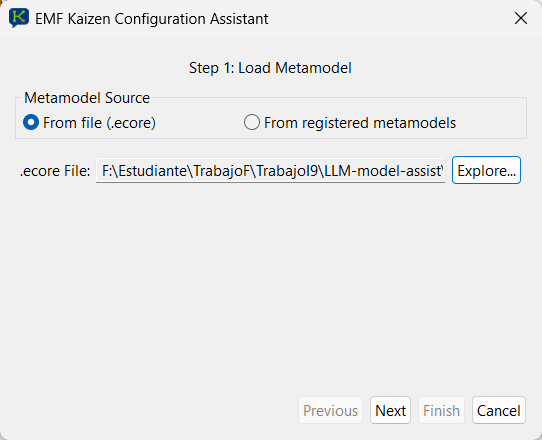
In the first step (left), the user selects the meta-model that will serve as
context for the assistance. The meta-model can be loaded either from a local
.ecore file or from the set of meta-models already registered
in the Eclipse environment. This allows EMF Kaizen to operate both on
project-specific languages and on standard modelling languages available
in the workspace.
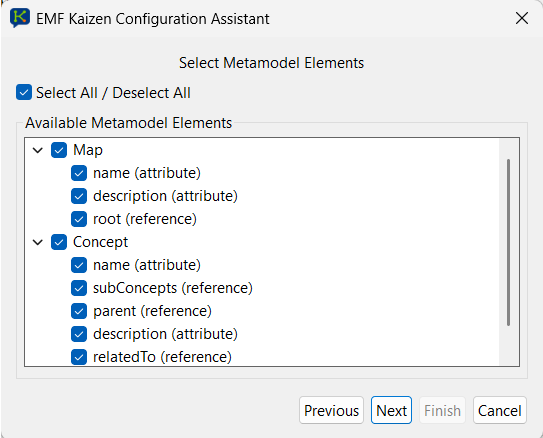
In the second step (right), the assistant presents all concrete classes and all changeable, non-derived attributes and references defined in the selected meta-model. The user can then select the subset of elements that are relevant for the intended modelling task. Filtering irrelevant or non-changeable elements reduces prompt size and prevents the assistant from suggesting invalid or undesired model constructs.
In the final step (bottom), the user provides a natural-language description of the modelling language. This description can be written manually or generated automatically by EMF Kaizen and refined by the user. The resulting description is incorporated into the assistant’s prompts to enrich the structured meta-model information with domain-level semantics.
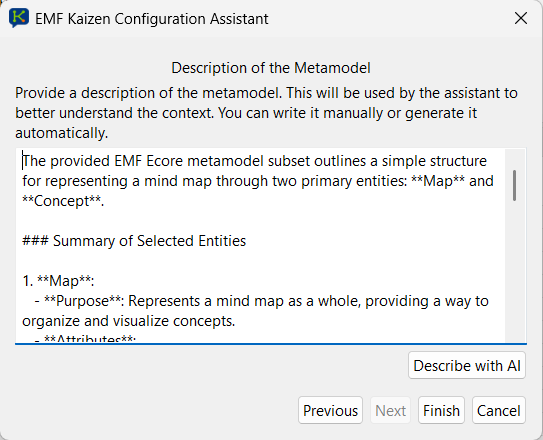
Configuration Assistant workflow. Top: selection of the target meta-model and filtering of relevant meta-model elements. Bottom: provision or generation of a natural-language description of the modelling language, used to enrich the context passed to the LLM.
EMF Kaizen provides a dedicated LLM Preferences Page that allows the user to configure the large language model used by the assistant. This configuration determines which LLM provider is employed and how inference requests are performed during modelling assistance.
As shown in the figure, the user can first select the LLM provider to be used by EMF Kaizen. The assistant currently supports models from multiple vendors, including OpenAI (GPT models) and Google (Gemini models). Access to the selected provider requires an API key, which can be entered and validated directly within the preferences page.
The preferences page also allows configuring request-level constraints, such as the maximum request timeout, which bounds the time the assistant waits for a response from the selected LLM during an assistance interaction.
In addition, EMF Kaizen supports the definition and selection of LLM configuration profiles. These profiles encapsulate model-specific parameters and can be predefined (e.g., cost-optimised or deterministic configurations) or customised by the user. When defining a custom profile, the user selects the concrete LLM version and configures advanced inference parameters.
Advanced parameters include, depending on the selected model, settings such as temperature, top-p sampling, maximum output tokens, and the level of reasoning when supported by the LLM. These parameters allow users to control the trade-offs between determinism, response diversity, output size, and reasoning depth of the generated assistance.
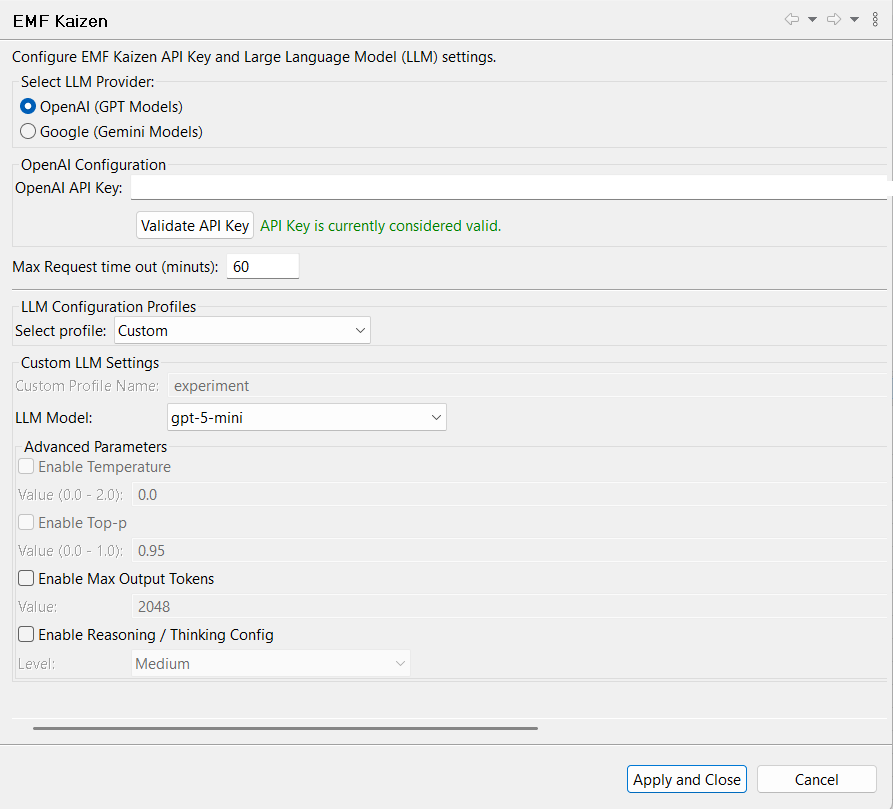
LLM Preferences Page. The user selects the LLM provider and API key, configures request constraints, and chooses or defines LLM configuration profiles that control model selection and inference parameters used by EMF Kaizen.
Once the modelling context and LLM preferences have been configured, users interact with EMF Kaizen through a conversational interface embedded in the Eclipse environment. Modelling assistance is requested using natural language, allowing users to express modelling intentions without relying on predefined commands or menus.
As illustrated in the figure, modelling requests are issued through the Chat View. Each request is analysed by EMF Kaizen to identify the user’s intent, distinguishing between explanatory questions and model completion requests. The assistant interprets the request in relation to the current EMF model, its meta-model, the selected model elements (if any), and the ongoing interaction history.
For model completion requests, EMF Kaizen constructs a structured prompt that combines the user’s request with the active modelling context and sends it to the configured LLM. The LLM response is then parsed into one or more model fragments that conform to the configured meta-model.
Generated model fragments are presented separately in the Result View, where they can be inspected before incorporation. Recommendations are shown in a tree-based representation, including newly created objects, attribute values, and references. This separation allows users to retain full control over which parts of the generated content are incorporated into the model under construction.
Explanatory requests, such as questions about the current model or its meta-model, are answered directly in natural language within the chat interface, without producing model fragments. This unified interaction model enables both modelling assistance and conceptual clarification within the same conversational workflow.
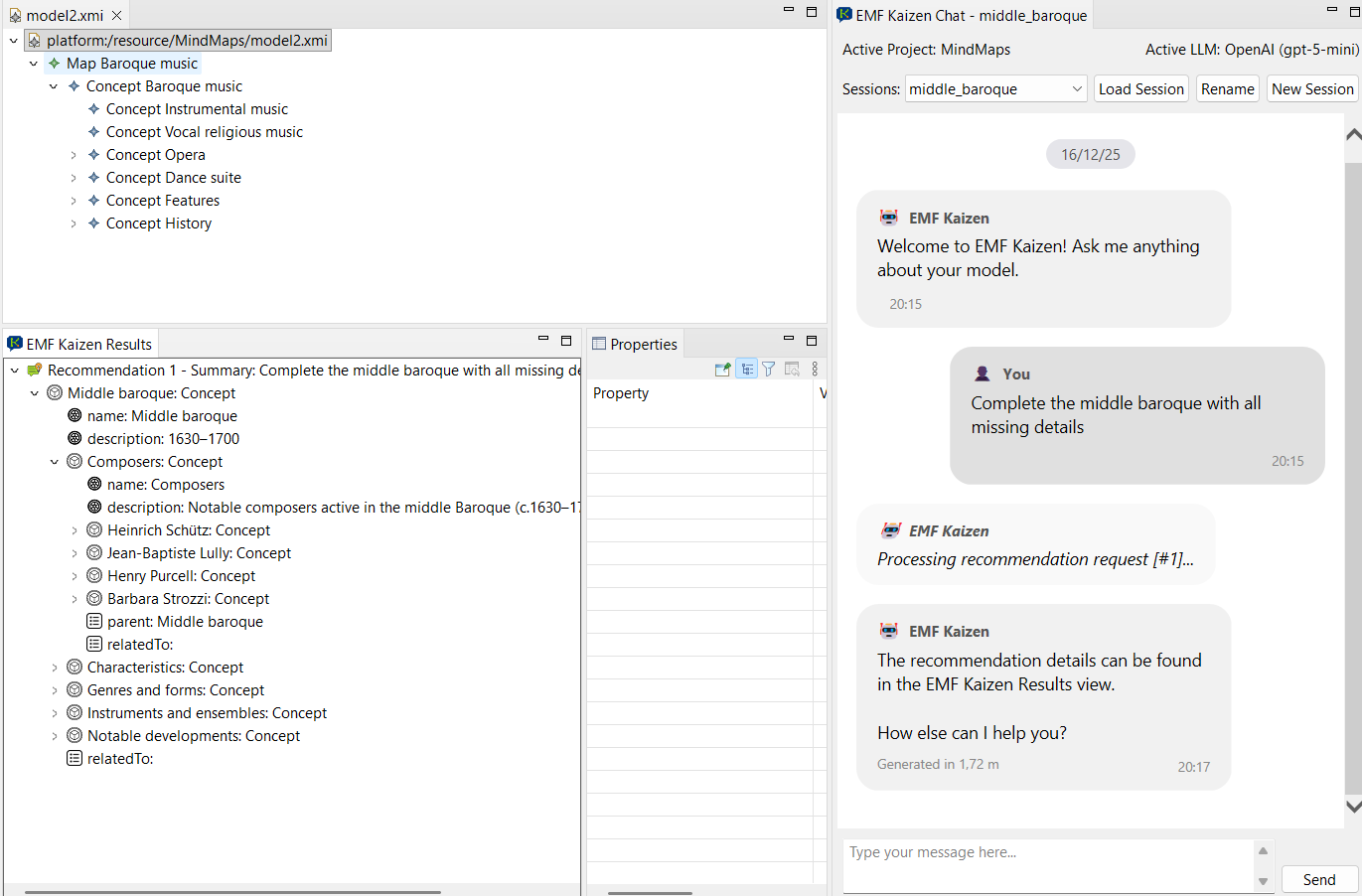
Natural-language modelling request issued through the EMF Kaizen Chat View. The assistant processes the request using the active model and meta-model as context, and presents the resulting model fragment recommendations in the Result View for inspection and controlled incorporation.
When a modelling request results in model completion, EMF Kaizen presents the generated recommendations in a dedicated Result View, clearly separated from the model under construction. Each recommendation corresponds to a set of model fragments produced by the assistant in response to a specific natural-language request.
As illustrated in the figure, recommended model fragments are displayed in a tree-based structure that mirrors the organisation of EMF models. This representation allows users to inspect newly proposed objects, their attributes, and their references before any modification is applied to the target model.
Integration of recommendations is fully user-controlled. Users can incorporate entire recommendations or selectively integrate individual elements via drag-and-drop operations into the EMF modelling editor. During this process, recommended objects are cloned, ensuring that the same recommendation can be reused multiple times without side effects.
Partial integration is also supported. When only a subset of a recommended fragment is incorporated, EMF Kaizen ensures that the integrated elements remain consistent, avoiding issues such as unintended dependencies on non-integrated objects. This enables incremental adoption and refinement of generated content within existing models.
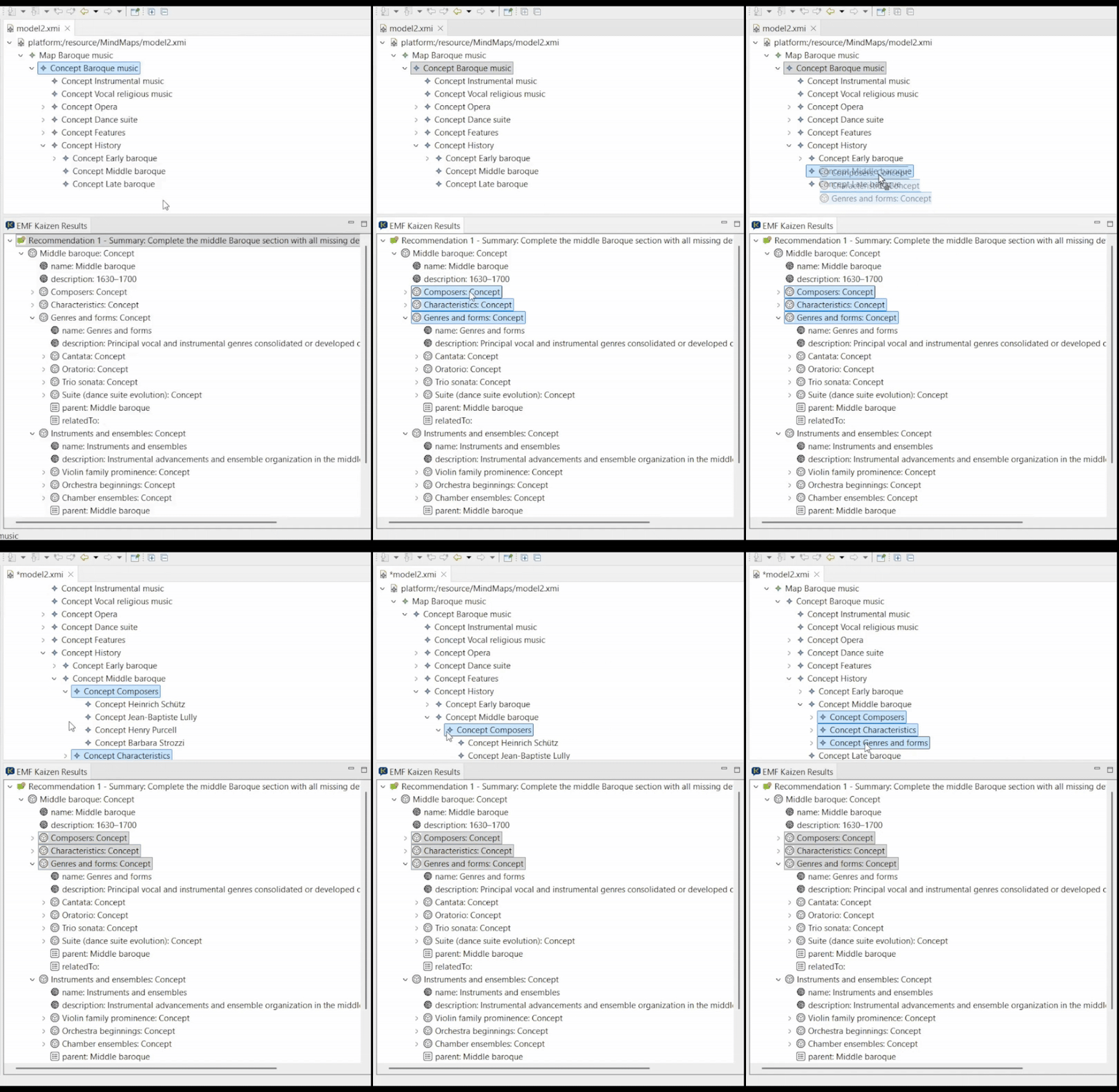
Result View displaying recommended model fragments in a tree-based representation. Users inspect the generated content and selectively integrate model elements into the target EMF model using drag-and-drop operations.
EMF Kaizen is implemented as a modular Eclipse plugin architecture that integrates conversational modelling assistance directly into the EMF-based modelling environment. Its design separates user interaction, configuration, assistance logic, and session management, enabling extensibility and flexible integration with different modelling languages and LLM providers.
As illustrated in the figure, EMF Kaizen is embedded into Eclipse through standard extension mechanisms, contributing dedicated views, menus, and preference pages. Modellers interact with the assistant primarily through the Chat View and the Result View, which operate alongside the standard EMF modelling editor. Language engineers configure the assistant through the Configuration Assistant and the LLM Preferences Page, both exposed via Eclipse menus and preferences.
At the core of the architecture lies the Assistance subsystem, which processes user requests. Incoming natural-language requests are first analysed by an Intent Classifier, which distinguishes between explanatory questions, model completion requests, and off-topic inputs. Based on the detected intent, the Prompt Builder assembles structured prompts that combine the user request with the active modelling context, meta-model information, configuration data, and conversation history.
Communication with external Large Language Models is handled through a dedicated abstraction layer, allowing EMF Kaizen to interact with different LLM providers, such as OpenAI GPT models and Google Gemini models. Responses returned by the LLMs are processed by the JSON Parser and Serialiser, which transforms generated model fragments into EMF-compatible objects while filtering invalid or non-conformant elements.
Generated recommendations and conversational interactions are managed by the Session Manager, which persists chat histories and recommended model fragments across modelling sessions. This enables long-running workflows, reuse of recommendations, and traceability of modelling decisions over time.
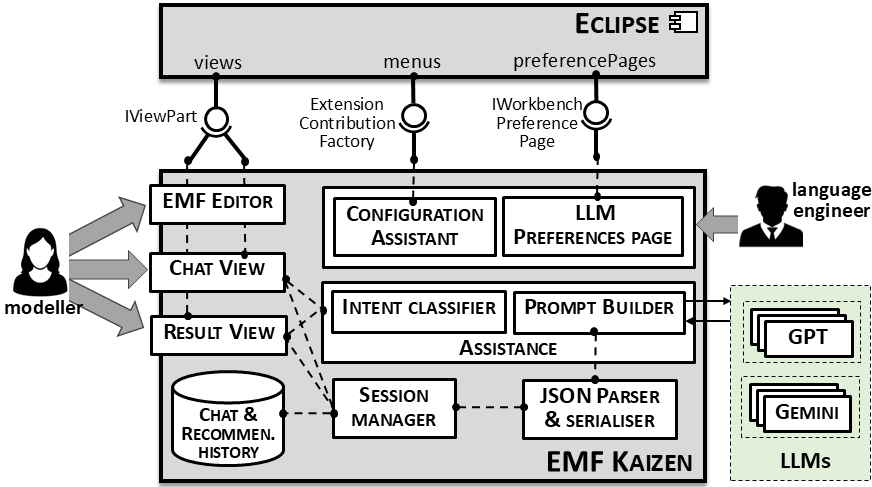
High-level architecture of EMF Kaizen. The assistant integrates with Eclipse through views, menus, and preference pages, and comprises configuration, assistance, and session management subsystems. External LLM providers are accessed through a dedicated interface, while generated model fragments are parsed and integrated into EMF-based modelling environments.
EMF Kaizen is developed as part of an academic research effort within the field of Model-Driven Engineering, focusing on the integration of Large Language Models into modelling and meta-modelling environments.
The tool is developed by members of the Modelling & Software Engineering Research Group (MISO) at the Universidad Autónoma de Madrid (UAM), Spain. The research is conducted by Lissette Almonte, Jefferson Iván Rengifo, Esther Guerra, and Juan de Lara, and is supported by the Computer Science Department at UAM.